
· Serhii Siryk · Development · 11 min read
Taming Local npm Library Development Without the Pain of npm link
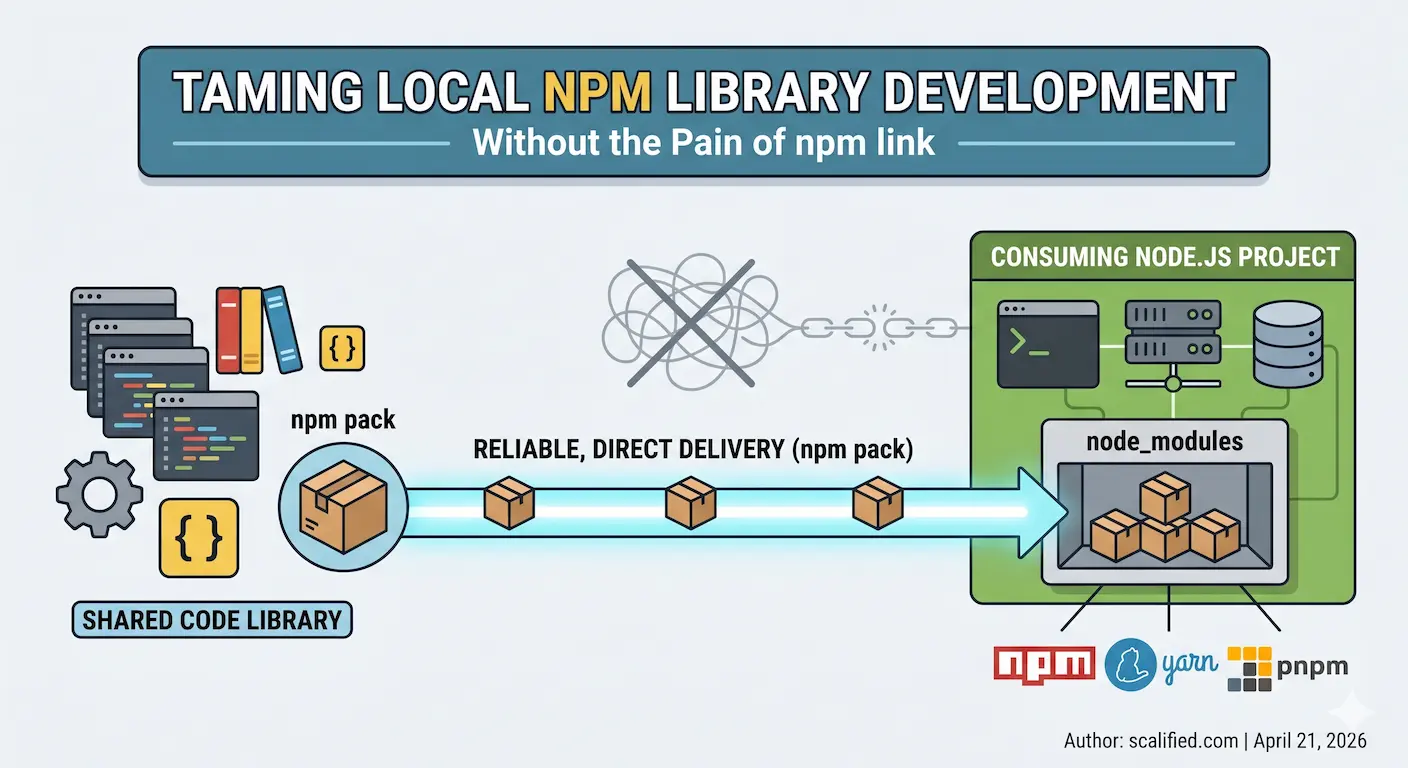
If you work in a monorepo and maintain shared libraries consumed by multiple external projects, you know the pain. The feedback loop between “I changed something in the lib” and “I can see it working in the app” is where developer happiness goes to die. This article explains the problem in detail and shows a simple, no-fuss solution that has worked well in production teams.
The Problem: Publish, Install, Repeat
Imagine this scenario: you have a shared library — say, a common utilities package — living in its own monorepo. Several other projects depend on it: a couple of NestJS backend services and an Angular frontend. All of them are running locally while you are actively developing features that span both the library and the consuming apps.
Every time you tweak something in the library, you need the consuming projects to pick up the change. The naive approach is to publish the library to a private npm registry and bump the version. That means:
- Increment the patch version (or publish with the same version and hope for the best)
- Run the publish command
- Switch to each consuming project and run
npm installor equivalent - Wait for the install to finish
- Observe the result
- Go back to step 1
If there are a lot of small, exploratory changes — the kind that happen during active development — you end up doing this cycle dozens of times a day. It kills momentum.
Publishing with the same version is also risky. Your private registry is shared: teammates pull from it, CI/CD pipelines pull from it. Silently overwriting a version with different code is a recipe for subtle, hard-to-reproduce bugs in other people’s environments. So you increment the version each time, which adds noise to your commit history and makes releases meaningless.
The Obvious Solution: npm link
The first thing most developers reach for is npm link (or its equivalents in yarn and pnpm). The idea is elegant: instead of installing a built tarball, you symlink your local library source directly into the consuming project’s node_modules. Change the library, and the consuming project immediately sees the new code.
In practice, it works — until it doesn’t.
The Cross-Package-Manager Problem
Real-world codebases rarely have the luxury of a uniform toolchain. One project might use plain npm, another yarn 1.x (classic), another yarn 4.x (Plug’n’Play), and yet another pnpm. Each package manager implements linking differently:
- npm link creates a global symlink and a local counterpart. It breaks easily when the library has its own
node_moduleswith packages that also exist in the consuming project — you end up with two separate instances of the same module, causing cryptic runtime errors likeinstanceofchecks failing across module boundaries. - yarn 1.x has
yarn link, which behaves similarly but has its own set of quirks around hoisting. Peer dependencies are particularly painful because yarn classic hoists aggressively, so the “wrong” version of a peer dep might be resolved from the library’s own folder rather than the consumer’s. - yarn 4.x defaults to Plug’n’Play, which does away with
node_modulesaltogether — our approach requiresnode_modulesto exist and won’t work with PnP. That said, yarn 4.x supports opting back into a traditional layout vianodeLinker: node-modulesin.yarnrc.yml, and with that setting the approach described here works fine. The linking story in PnP mode is its own rabbit hole. - pnpm uses a content-addressable store and hard links. Its
pnpm linkcommand works differently again, and symlinks to external directories don’t always play nicely with pnpm’s strict module resolution.
Diagnosing link-related issues is notoriously tricky. The errors are often indirect — an unexpected singleton violation, a missing peer dependency warning that wasn’t there before, a version mismatch buried deep in the resolution tree. When you mix package managers across projects (which is common when teams evolve independently), troubleshooting becomes a significant time sink.
The Dev Server Problem
Even when linking works from a module-resolution standpoint, there is a subtler issue: dev servers and file watchers.
Consider a typical local setup: two NestJS services managed by nodemon and an Angular frontend served by ng serve. All three consume the shared library. You have the library’s build in watch mode, so every time you save a file in the library, it rebuilds.
With npm link, the library’s dist/ folder is symlinked into each consumer’s node_modules. When the library rebuilds, it typically clears dist/ first, then writes new files. That sequence — delete, then write — confuses many file watchers:
- nodemon usually handles this acceptably, though it occasionally needs a manual restart.
- Angular’s
ng servehandles it poorly. When the linkeddist/is cleared during a rebuild, the watcher sees the deletion and enters an error state. The subsequent file writes don’t always trigger a clean recovery. You often end up with a broken dev server that requires a full restart. And then the symlink itself may need to be re-established. You find yourself layering workarounds on workarounds:--preserve-symlinksflags, custom webpack aliases, polling-based file watchers — each one adding fragility and cognitive overhead.
Every tech stack has its own variant of these problems. What works for one combination of bundler, package manager, and dev server may not work for another, and the documentation for edge cases is scattered across GitHub issues and Stack Overflow threads.
Existing Tools That Try to Solve This
To be fair, the community has recognised this problem and built dedicated tools:
- Yalc — a tool that mimics a local npm registry, letting you
yalc publisha library andyalc addit in consuming projects. It’s more reliable than raw symlinks but introduces another CLI tool, a global store to manage, and specific commands to learn. Projects need to be aware of Yalc-added dependencies in theirpackage.json. - Verdaccio — a full-featured, self-hosted npm registry you can run locally. It solves the problem completely but at the cost of running a background service, configuring
.npmrcin every project, and managing a local registry just for development purposes. - npx link — a safer drop-in replacement for
npm linkby the same author who wrote a detailed breakdown of whynpm linkshould be avoided. It fixes several of npm link’s worst footguns: it doesn’t globally install the package or its binaries, doesn’t remove previously linked packages when you add a new one, and works consistently across Node.js versions. It also has a publish mode that uses hard links instead of symlinks to more closely replicate a realnpm install. It is a meaningful improvement over rawnpm link, but it’s still a new dependency to learn and doesn’t solve all the convenience issues we try to solve.
All of these are legitimate tools with real value. But they each introduce overhead: new commands to learn, additional configuration, extra services to run. If your goal is simplicity and you already have a build pipeline you trust, there is a lighter path.
A Simpler Approach: Pack and Extract
The core insight is this: npm pack produces a .tgz tarball that is structurally identical to what gets published to a registry. If you extract that tarball directly into a consuming project’s node_modules, the result is indistinguishable from a real npm install. No symlinks. No registry. No magic.
This is exactly what a small Node.js script — update-package.js — does. It lives in the library’s repository and is wired into the build pipeline via an Nx target. Here is how it works end to end.
The Script
// update-package.js - Replace npm package with tarball contents in local projects
// Usage: MYORG_PROJECTS=/path1,/path2 node update-package.js <package> <tarball>

const { execSync } = require('child_process');
const fs = require('fs');
const path = require('path');

const [, , packageName, tarballPattern] = process.argv;

if (!tarballPattern || !packageName) {
  console.error('Usage: MYORG_PROJECTS=/path1,/path2 node update-package.js <package> <tarball>');
  process.exit(1);
}

const projects = process.env.MYORG_PROJECTS?.split(',')
  .map((p) => p.trim())
  .filter((p) => p);

if (!projects?.length) {
  console.error('Error: MYORG_PROJECTS env var not set');
  console.error('Example: MYORG_PROJECTS=/path/to/project1,/path/to/project2');
  process.exit(1);
}

const tarballPath = path.resolve(tarballPattern);

if (!fs.existsSync(tarballPath)) {
  console.error(`Error: Tarball not found: ${tarballPath}`);
  process.exit(1);
}

const [scope, name] = packageName.split('/');

let updatedCount = 0;
let skippedCount = 0;

for (const repoRoot of projects) {
  const targetDir = path.join(repoRoot, 'node_modules', scope);
  const packageDir = path.join(targetDir, name);

  if (!fs.existsSync(packageDir)) {
    console.log(`⏭️  Skipping ${packageName} in ${repoRoot} (not installed)`);
    skippedCount++;
    continue;
  }

  console.log(`📦 Updating ${packageName} in ${repoRoot}...`);

  try {
    execSync(
      `rm -rf "${packageDir}" && ` +
        `mkdir -p "${targetDir}" && ` +
        `tar -xzf "${tarballPath}" -C "${targetDir}" && ` +
        `mv "${path.join(targetDir, 'package')}" "${packageDir}"`,
      { stdio: 'pipe' }
    );
    updatedCount++;
  } catch (error) {
    console.error(`❌ ${repoRoot}: ${error.message}`);
  }
}

console.log(`✅ Updated ${packageName} in ${updatedCount} project(s), skipped ${skippedCount}\n`);
The script reads a MYORG_PROJECTS environment variable containing a comma-separated list of local project paths. For each library being updated, it checks whether that library is installed in the target project’s node_modules. If it isn’t installed, it skips silently — no noise, no errors. If it is installed, it removes the old directory and extracts the fresh tarball in its place.
The selective-update logic matters: you might have three consuming projects, but only two of them use a particular library. The script handles that automatically without any per-project configuration.
The Nx Target
The script is invoked via an Nx publish:local target defined in the library’s project.json:
"publish:local": {
  "executor": "nx:run-commands",
  "dependsOn": ["build:libs"],
  "options": {
    "commands": [
      "cd dist/libs/shared && npm pack",
      "cd dist/libs/nest-shared && npm pack",
      "cd dist/libs/ng-shared && npm pack",
      "cd dist/libs/nextjs-shared && npm pack",
      "node scripts/update-package.js @myorg/shared dist/libs/shared/*.tgz",
      "node scripts/update-package.js @myorg/nest-shared dist/libs/nest-shared/*.tgz",
      "node scripts/update-package.js @myorg/ng-shared dist/libs/ng-shared/*.tgz",
      "node scripts/update-package.js @myorg/nextjs-shared dist/libs/nextjs-shared/*.tgz"
    ],
    "parallel": false
  }
}
The dependsOn: ["build:libs"] ensures the libraries are always compiled fresh before packing. The commands run sequentially: build, pack each library into a tarball, then distribute each tarball to all configured projects. The entire pipeline is triggered with a single command:
yarn nx run @myorg/source:publish:local
Configuration
The only configuration required is a shell environment variable pointing at the consuming projects:
# Single project
export MYORG_PROJECTS="$HOME/projects/project-1"

# Multiple projects
export MYORG_PROJECTS="$HOME/projects/project-1,$HOME/projects/project-2"
Add this to your .zshenv or .bashrc for persistence. No absolute paths ever appear in configuration files committed to the repository — the paths live in the developer’s local environment, which is where they belong.
What the Output Looks Like
The script runs once per library, and the full publish:local command processes all of them in sequence. Here is what a typical run looks like across three registered projects with four libraries in the monorepo:
📦 Updating @myorg/shared in $HOME/projects/project-1...
📦 Updating @myorg/shared in $HOME/projects/project-2...
⏭️  Skipping @myorg/shared in $HOME/projects/project-3 (not installed)

✅ Updated @myorg/shared in 2 project(s), skipped 1

📦 Updating @myorg/nest-shared in $HOME/projects/project-2...
⏭️  Skipping @myorg/nest-shared in $HOME/projects/project-1 (not installed)
⏭️  Skipping @myorg/nest-shared in $HOME/projects/project-3 (not installed)

✅ Updated @myorg/nest-shared in 1 project(s), skipped 2

📦 Updating @myorg/ng-shared in $HOME/projects/project-1...
⏭️  Skipping @myorg/ng-shared in $HOME/projects/project-2 (not installed)
⏭️  Skipping @myorg/ng-shared in $HOME/projects/project-3 (not installed)

✅ Updated @myorg/ng-shared in 1 project(s), skipped 2

⏭️  Skipping @myorg/nextjs-shared in $HOME/projects/project-1 (not installed)
⏭️  Skipping @myorg/nextjs-shared in $HOME/projects/project-2 (not installed)
⏭️  Skipping @myorg/nextjs-shared in $HOME/projects/project-3 (not installed)

✅ Updated @myorg/nextjs-shared in 0 project(s), skipped 3
A few things worth noting here. Each library is distributed independently: @myorg/shared goes to project-1 and project-2 because they have it in their node_modules, while project-3 doesn’t use it and is silently skipped. @myorg/nest-shared only lands in project-2 — a backend-only package that the frontend and the third project have no use for. @myorg/nextjs-shared happens to not be installed anywhere in the current set of projects, so it produces zero updates without any error. The script never touches a project that doesn’t already have the package, and it never requires you to declare which project uses which library — it simply checks node_modules and acts accordingly.
Why This Works Better Than Linking
The critical difference is that after running the script, the consuming project’s node_modules contains a real installation, not a symlink. From the perspective of every tool in the chain — the bundler, the dev server, the file watcher, the module resolver — the package is just another installed dependency.
This means:
- Angular’s
ng servepicks up the update cleanly on the next file change, because there is no symlink to break and nodist/directory being deleted out from under it. - nodemon restarts normally, because the files it watches change atomically from its point of view.
- Module resolution is consistent, because there is only one copy of each package at a well-known path, regardless of which package manager the consuming project uses.
- Peer dependencies resolve correctly, because the package is laid out exactly as a real install would lay it out.
The tradeoff is that the update is not instant — you trigger it manually after making changes. But a single command that takes a few seconds is far better than a broken dev server, a debugging session to track down a duplicate-module error, or a publish-install cycle repeated fifty times a day.
Summary
The approach is not sophisticated, which is the point. It leans on standard npm tooling — npm pack and tar — to produce and distribute packages in a format that every consuming tool already understands perfectly. There is no new abstraction to learn, no background service to run, and no configuration files to keep in sync across projects.
If you manage shared libraries consumed by multiple local projects and have grown tired of fighting the edge cases of npm link, this pattern is worth a try. Drop the script into your library repository, wire it into your build system, export one environment variable, and get back to writing code.